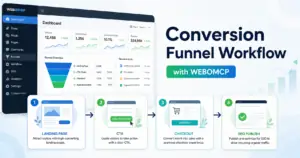
AI publishing workflows can be fast enough to create a new WordPress problem: content moves before the right person has checked the risk. A human-in-the-loop approval step keeps the useful parts of automation while making sure final decisions still belong to your team.
For WordPress teams using MCP, that approval layer is not a bottleneck. It is the rule that decides when an AI agent may draft, audit, update, or publish, and when it must pause for review.
What human-in-the-loop means in a WordPress MCP workflow
Human-in-the-loop WordPress MCP approvals are checkpoints in a workflow where an AI agent prepares an action, explains what it plans to change, and waits for an authorized person before that action affects the site.
In a normal WordPress publishing flow, a human might research the topic, write the draft, add links, set the slug, and click publish. In an MCP workflow, the AI agent can help with many of those steps through a structured connection to WordPress. If the concept is new, this overview of a WordPress MCP plugin explains the foundation.
The approval layer is what turns that connection into an operational workflow instead of an open-ended command channel. The agent can prepare useful work, but your rules decide what requires confirmation.
Where approval gates belong
The best approval gates are placed at the moments where a wrong action would be expensive, visible, or hard to undo. For WordPress sites, that usually means four points in the workflow.
1. Topic and intent approval
Before an agent writes a post, a human should approve the topic, search intent, audience, and conversion goal. This prevents thin content, duplicate topics, and posts that compete with existing pages.
A useful approval prompt at this stage asks: Does this topic serve a real search need? Does it support a known content cluster? Is there already a post with the same slug or intent?
2. Claim and source approval
AI can draft quickly, but it should not invent features, pricing details, product claims, customer results, or performance numbers. Any sentence that could affect trust should be reviewed by a person who understands the product and the market.
This is especially important for plugin and automation content. A safe workflow separates product facts from editorial suggestions so the reviewer can see which statements need evidence before publishing.
3. WordPress action approval
Publishing, updating a live page, deleting content, changing a permalink, modifying SEO metadata, and touching site settings should all be treated differently from drafting. These actions affect the public site, search visibility, or admin operations.
Teams that use AI agents with WordPress should pair approval gates with permission design. The practical security side is covered in this guide to WordPress MCP security best practices.
4. Final pre-publish approval
The last approval step should check the visible article, not just the draft text. Review the title, slug, excerpt, links, CTA, image plan, formatting, and publish status together.
A strong final check answers one simple question: If this goes live now, is the site better for readers and safer for the business?
A practical approval model for AI-assisted publishing
A useful human-in-the-loop workflow does not require a human to approve every tiny edit. It separates low-risk preparation from high-risk execution.
Actions an AI agent can usually prepare
- Find existing posts and pages related to a topic.
- Suggest a slug, SEO title, meta description, and outline.
- Draft body content in clean WordPress-compatible HTML.
- Suggest contextual internal links to already-published pages.
- Prepare image ideas, alt text, and filenames.
- Create a draft or update an unpublished draft when the workflow allows it.
Actions that should require approval
- Publishing or scheduling a post.
- Changing a live URL or canonical slug.
- Updating product claims, pricing references, or feature descriptions.
- Editing core conversion pages such as home, pricing, checkout, or account pages.
- Deleting posts, pages, media, users, or settings.
- Changing plugin configuration, user permissions, or automation credentials.
The point is not to slow the system down. The point is to make sure the agent spends its speed on preparation while humans keep control of judgment, risk, and final publication.
How to structure the approval request
A good approval request should be easy to review in one screen. It should not ask the reviewer to infer what changed or why it matters.
For a WordPress MCP publishing workflow, the approval summary should include:
- The proposed title, slug, and public URL.
- The target keyword, search intent, and funnel stage.
- Whether the item is new or an update to an existing post.
- The internal links added and why they fit.
- The CTA and destination page.
- Any claims that need human verification.
- The exact WordPress action being requested, such as publish, update, schedule, or move to trash.
This is where a slug-first publishing workflow becomes valuable. If the workflow checks the intended slug before writing, the reviewer can catch duplicate topics and permalink problems before content is created.
Where WEBOMCP fits
WEBOMCP is useful when a team wants an AI client to work with WordPress through a structured MCP layer instead of relying on loose manual copy-paste. That structure matters because approval workflows depend on clear actions, permissions, and predictable site context.
For example, a team can use WEBOMCP in a workflow where the agent gathers existing WordPress context, drafts an article package, proposes internal links, and prepares the post. The human reviewer can then approve the final publish action only after checking the content and metadata.
If your workflow needs more site-specific actions over time, review the available WEBOMCP addons and decide which ones match the actual WordPress operations your team wants to automate.
Common mistakes to avoid
- Approving too late: If the first approval happens after the full draft is written, the agent may spend time on the wrong topic.
- Approving too broadly: A vague approval such as “handle SEO” can hide risky actions. Approve specific actions instead.
- Skipping duplicate checks: Always check existing posts and pages by slug and intent before creating a new item.
- Trusting generated claims: Product claims, integration details, and pricing references need human verification.
- Ignoring rollback: Know how to revert a publish, restore a revision, or fix a permalink before automation touches live content.
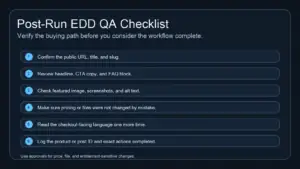
Pre-publish checklist for WordPress MCP approvals
- The topic supports a defined content cluster.
- The slug is unique across posts and pages.
- The SEO title is clear and under 65 characters.
- The meta description is useful and under 155 characters.
- Internal links point to relevant live URLs.
- The CTA matches the reader’s stage of awareness.
- No unsupported statistics, customer claims, or feature promises appear in the content.
- The final WordPress action is explicit and reversible where possible.
Visuals that make the workflow easier to review
If this process becomes an internal SOP or article asset, use visuals that clarify decisions instead of decorative stock images.
- Featured diagram:
human-in-the-loop-wordpress-mcp-approvals.webp. Alt text: “Approval workflow showing an AI agent pausing before WordPress publishing.” Placement: near the introduction. - Workflow checklist:
wordpress-mcp-pre-publish-checklist.webp. Alt text: “Checklist for reviewing title, slug, internal links, CTA, and publish status.” Placement: near the pre-publish checklist. - Permission map:
wordpress-mcp-approval-permissions.webp. Alt text: “Map of low-risk AI preparation tasks and high-risk WordPress actions requiring approval.” Placement: near the practical approval model.
FAQ
Does human-in-the-loop mean every AI action needs approval?
No. Low-risk preparation can often run without interruption. Approval should be required when the action affects public content, SEO visibility, business claims, user permissions, or site configuration.
Can an AI agent publish WordPress posts safely?
It can be part of a safe workflow when permissions, duplicate checks, content review, and final approval are clearly defined. The risk comes from letting the agent publish without context or review.
What should the human reviewer focus on?
The reviewer should focus on intent, accuracy, brand fit, risky claims, internal links, CTA relevance, slug uniqueness, and the exact WordPress action being approved.
Build approval into the workflow, not after it
Human-in-the-loop approval works best when it is designed into the publishing process from the start. Let the AI agent prepare, compare, draft, and summarize. Let humans approve the decisions that affect trust, visibility, and business risk.
Ready to map a safer AI publishing workflow for your WordPress site? Start with WEBOMCP core plugin and workflow addons, then compare available WEBOMCP plans when you are ready to turn the process into a repeatable system.