AI-assisted publishing breaks down when the workflow treats a WordPress post as a disposable draft instead of a canonical URL. A title can change, a brief can evolve, and an article can be rewritten, but the slug should be decided before the automation creates or updates anything.
This tutorial shows a slug-first WordPress publishing workflow for teams using AI agents, REST API automations, or a WordPress MCP setup such as WEBOMCP as a WordPress MCP plugin. The goal is simple: publish useful content without creating duplicate posts, unstable URLs, or accidental -2 slugs.
What slug-first WordPress publishing does
Slug-first publishing means the automation chooses the intended URL slug before it decides whether to create a new post. The slug becomes the lookup key for the workflow, not an afterthought generated from the title.
That matters because AI content workflows often run more than once. A brief may be improved, an editor may rerun the prompt, or a scheduled automation may retry after a timeout. If every run starts with “create post,” WordPress can end up with multiple drafts or published posts that compete for the same search intent.
A safer flow is idempotent: the same topic and slug should lead back to the same WordPress item. If the item exists, update it. If it does not exist, create it once and store the canonical ID.
Before you start
Prepare the workflow before giving an agent publishing access. You need a WordPress user with the right role, an Application Password or equivalent credential, and a clear rule for which content types the automation can touch.
If your agent can publish directly, apply the same care you would use for any production credential. The WordPress MCP security model should include least privilege, private credential storage, and logs that never print passwords, tokens, cookies, nonces, or authorization headers.
- Choose the target post type before the run starts.
- Define the slug in lowercase, hyphen-separated form.
- Keep a memory record of the canonical post ID, slug, and public URL.
- Decide whether failed publish checks should retry, stop, or alert a human.
Step-by-step slug-first workflow
1. Define the canonical slug before writing
Start with search intent, then turn the topic into a short slug. For example, a tutorial about preventing duplicate AI-generated posts can use slug-first-wordpress-publishing.
Do this before generating the final body content. The title may become sharper during editing, but the URL should stay stable unless the topic itself changes.
2. Search by slug across relevant statuses
Before creating a post, query WordPress for the intended slug across the statuses your workflow might encounter: publish, draft, pending, private, future, and trash. Check both posts and pages if the automation can create either one.
This prevents two common mistakes: updating only published content while a draft already exists, and recreating a trashed item with the same topic because the workflow never looked in trash.
3. Update the existing item when a match exists
If WordPress returns a match for the slug, update that item by ID. Keep the slug unchanged, refresh the title, body, excerpt, taxonomy, and status, then set the final status to publish only when the content passes your checks.
This is the core reliability benefit. The automation can run again without changing the URL, losing internal links, or creating a second article for the same keyword.
4. Create a new post only when no match exists
If no post or page uses the intended slug, create the new post with the slug included in the create request. Do not rely only on WordPress title-to-slug generation, because small title changes can produce different URLs.
For AI-assisted WordPress operations, this pattern pairs well with structured tool calls. A gateway like WEBOMCP can help teams think in terms of explicit actions, inputs, and verification instead of loose dashboard instructions.
5. Verify the saved post after publishing
After the create or update request succeeds, fetch the post again by ID. Confirm the final status is publish, the slug is exactly the intended slug, the public URL is available, and the content contains the expected CTA and internal links.
If WordPress returns a slug with -2, stop and investigate. That usually means another object already owns the intended URL. Publishing anyway can split ranking signals and confuse editors.
Configuration details that make the workflow reliable
The strongest slug-first workflows keep a small set of fields under automation control and leave everything else alone unless the run explicitly needs to change it.
- Canonical slug: The stable lookup key for the article.
- Canonical ID: The WordPress post ID stored after the first successful publish.
- SEO title: A concise title that matches the search intent and stays under typical snippet limits.
- Meta description: A short summary saved through the SEO plugin when available, or through the post excerpt as a fallback.
- Internal links: Contextual links to relevant hub, addon, solution, or security pages.
- Run log: The last publish result, public URL, and any verification notes.
If your workflow includes specialized actions through WEBOMCP addons, keep the same principle: identify the target object first, then mutate it deliberately. Slug-first publishing is just the content version of that broader operations pattern.
Common mistakes to avoid
- Searching only by title: Titles can change, and similar titles can point to different intents.
- Ignoring drafts and trash: Old test runs often hide there, then collide with future publishing.
- Publishing before verification: A successful API response is not the same as a verified public post.
- Letting retries create new posts: Retry logic should repeat the lookup, not jump straight to create.
- Logging credentials: Debug output should never expose secrets or authorization headers.
Best practices for SEO and operations
Use one primary keyword per article, but let the slug describe the topic rather than the exact keyword phrase. A good slug is short enough to read, stable enough to keep, and specific enough for editors to recognize later.
Keep internal links useful. Link to a concept page when the reader needs background, an addon page when the workflow requires a connector, and a pricing or product page only when the reader is ready to evaluate the tool.
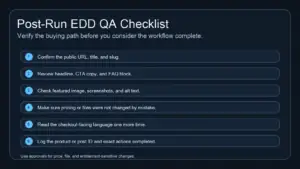
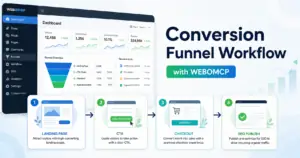
Finally, treat image planning as part of the publishing checklist. For this kind of tutorial, a useful featured image would be a simple workflow diagram named slug-first-wordpress-publishing-workflow.webp with alt text such as “Workflow diagram showing a slug lookup before WordPress post creation.” A supporting checklist image could be named wordpress-publishing-verification-checklist.webp and placed near the verification section.
Conclusion: make the slug the contract
Slug-first WordPress publishing gives AI content workflows a stable contract. The automation knows what URL it is responsible for, WordPress keeps one canonical article, and editors can safely rerun updates without cleaning up duplicate posts later.
Ready to turn this into a repeatable workflow? Explore WEBOMCP plans to connect AI agents with structured WordPress publishing, review, and site operations.
FAQ
Should an AI publishing workflow use the title or slug as the lookup key?
Use the slug. Titles are editorial and may change during rewriting, while the slug should represent the stable URL target.
What should happen if WordPress creates a -2 slug?
Stop the workflow and investigate the conflicting object. Do not treat the modified slug as a successful canonical publish.
Can this workflow update old posts?
Yes. If the intended slug already exists, update that post by ID and verify the final status, URL, CTA, and internal links.
Is the post excerpt enough for SEO metadata?
The excerpt is a useful fallback when SEO plugin fields are not available through the API. If your SEO plugin exposes metadata fields, update the SEO title, meta description, and focus keyword directly.