AI tools are becoming useful for WordPress work, but most teams still run into the same bottleneck: the AI can suggest changes, while a human still has to open the dashboard, find the right page, inspect the plugin settings, and make the update manually. A WordPress MCP plugin changes that workflow.
WEBOMCP is a WordPress MCP plugin built to connect AI agents with real WordPress actions, so agencies, freelancers, SEO teams, and site owners can audit, update, and manage WordPress sites through structured workflows instead of repetitive dashboard clicks.
What Is a WordPress MCP Plugin?
MCP stands for Model Context Protocol. In practical terms, MCP gives an AI agent a structured way to discover available tools, understand what each tool can do, and call those tools with clear inputs. For WordPress, that means an AI workflow can move beyond plain text suggestions and interact with site capabilities through a controlled API layer.
A WordPress MCP plugin acts as the bridge between the AI client and the WordPress site. Instead of asking an assistant to guess what is installed or manually copy instructions into wp-admin, the agent can request a tool list, choose the right capability, and run a specific operation with authentication and permission checks.
Why WordPress Teams Need a Workflow Layer
WordPress is flexible because it supports plugins, themes, custom post types, page builders, SEO tools, ecommerce systems, performance plugins, and multisite setups. That flexibility is also why operational work becomes messy. One site may use Elementor, Rank Math, WooCommerce, WP Rocket, and custom fields. Another site may use WP Ultimo, Easy Digital Downloads, or a different theme stack.
Without a workflow layer, teams repeat the same tasks across every project: checking page structure, reviewing SEO settings, updating content, auditing plugins, testing performance, managing media, and documenting what changed. WEBOMCP is designed to make those tasks more consistent by exposing WordPress capabilities as discoverable tools for AI-assisted workflows.
How WEBOMCP Works
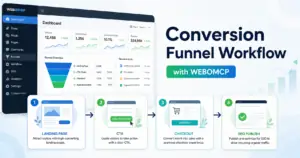
WEBOMCP exposes a WordPress MCP router that supports a structured flow: initialize the session, list available tools, and call the selected tool with validated arguments. This makes the workflow predictable. The AI agent does not need to invent tool names or assume what the site supports; it can discover the current site capabilities first.
- Tool discovery: the agent can inspect available WordPress, SEO, ecommerce, or addon tools.
- Permission-aware actions: tool access follows WordPress user permissions and authentication.
- Addon expansion: additional plugins can expose specialized capabilities for Elementor, Rank Math, WooCommerce, WP Rocket, WP Ultimo, and other workflows.
- Audit-friendly operations: teams can standardize repeatable checks instead of relying on manual dashboard reviews.
Core Use Cases for Agencies and Freelancers
For a WordPress freelancer, WEBOMCP can reduce the time spent switching between pages, posts, plugin screens, and SEO fields. For an agency, the bigger value is standardization. The same process can be reused across many client sites, which makes QA, handoff, and recurring maintenance easier to manage.
- Generate or update draft content with consistent structure.
- Audit landing pages before publishing or running ads.
- Review Elementor-heavy pages for duplicated sections and layout issues.
- Check SEO metadata and content gaps before optimization.
- Inspect plugin status, updates, and site health signals.
- Build repeatable workflows for content, SEO, ecommerce, and operations.
If your team is building multiple WordPress sites, start with the WEBOMCP homepage. From there, map the most repetitive workflow and turn it into a repeatable AI-assisted process.
Where Addons Fit Into the System
The core WEBOMCP plugin provides the foundation, but many real projects need domain-specific workflows. That is where addons become important. An Elementor workflow needs different actions from a WooCommerce workflow. A Rank Math workflow needs different checks from a WP Ultimo multisite workflow.
The addon model keeps the system flexible. Teams can focus on the capabilities they actually use, such as SEO automation, ecommerce operations, performance checks, multisite management, or page builder audits. This makes WEBOMCP useful for small sites while still scaling to complex WordPress operations.
Security and Control Still Matter
AI automation should not mean unrestricted access. A useful WordPress MCP workflow needs clear authentication, permission checks, and a way to avoid accidental destructive actions. WEBOMCP follows the WordPress permission model and is designed around explicit tool calls rather than hidden background changes.
That matters for teams. You can build workflows that help with content, SEO, and operations while still deciding which users, clients, or automations are allowed to run specific actions.
A Better Way to Scale WordPress Work
WEBOMCP does not replace WordPress, Elementor, Rank Math, WooCommerce, or your existing plugin stack. It adds an AI-ready workflow layer on top of them. The goal is simple: spend less time repeating dashboard tasks and more time improving the site.
For agencies, that means cleaner delivery. For freelancers, it means faster execution. For SEO teams, it means more consistent audits. For site owners, it means WordPress becomes easier to manage without losing control.
Next Step
Explore WEBOMCP and start building AI-assisted WordPress workflows today. Visit webomcp.com to learn how the core plugin and addons can support your WordPress operations.