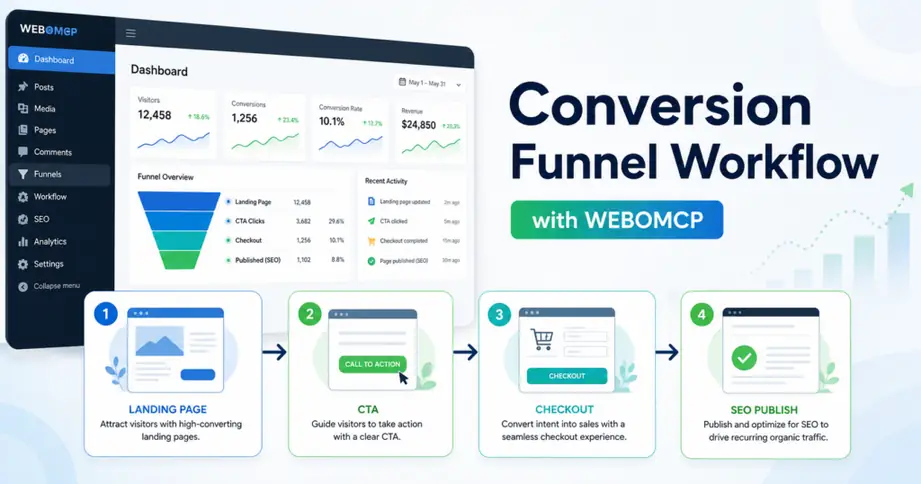
Most WordPress teams do not have a traffic problem alone. They have a handoff problem between the landing page, the CTA, the checkout step, and the SEO layer that keeps bringing qualified visitors back. A WordPress conversion funnel workflow with MCP gives you a repeatable way to review each stage, fix obvious leaks, and publish improvements without bouncing between disconnected tools.
In practical terms, this workflow is useful when you manage Elementor landing pages, product or checkout flows, and post-publish SEO tasks in the same operating loop. Instead of treating page QA, conversion checks, and metadata updates as separate jobs, you can run them as one structured WordPress process.
What a WordPress conversion funnel workflow actually covers
A conversion funnel workflow is not just about a prettier landing page. It connects the full path from search intent to action:
- the landing page matches the promise behind the query or campaign
- the CTA is visible and specific
- the checkout or form step removes friction
- the page or supporting content is published with solid SEO basics
That is where WEBOMCP becomes useful. It gives WordPress teams a structured MCP layer for checking content, updating fields, and standardizing repeatable publishing work across the funnel.
Why WordPress funnels break down so often
WordPress sites usually fail at the transition points, not the individual screens. A page may look fine in Elementor, but the CTA copy is vague. The checkout page may work, but the offer context disappears. The post may be published, but the supporting SEO data is inconsistent.
Common breakdowns include:
- headline and CTA mismatch
- layout issues on mobile blocks or above-the-fold sections
- too many form fields or weak checkout cues
- missing metadata after content updates
- no QA step before changes go live
These are exactly the kinds of issues that become easier to manage when your funnel is treated as an operational workflow instead of a one-off page edit.
Step 1: audit the landing page before you touch the CTA
Start with the entry page because the rest of the funnel inherits its problems. Review the headline, supporting copy, section order, mobile spacing, page speed risks, and whether the primary action is obvious without scrolling too far.
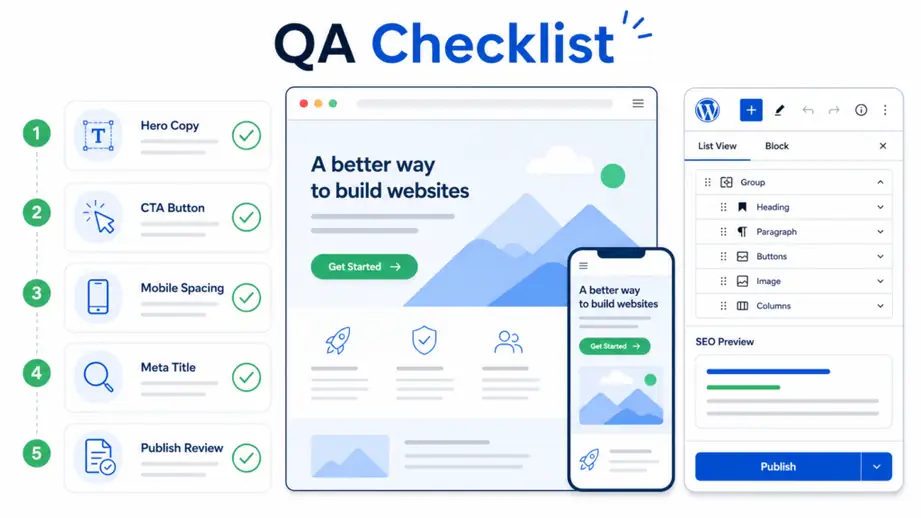
If your team already uses Elementor, a good starting point is a dedicated Elementor content QA workflow. That keeps design and content checks in the same review pass instead of waiting for conversion numbers to tell you something is off.
At this stage, ask simple questions:
- Does the page explain the offer in the first screen?
- Is there one primary action, or are visitors forced to choose between too many paths?
- Does the CTA text describe the next step clearly?
- Do trust cues appear before the user reaches checkout?
Step 2: tighten the CTA and intent path
After the landing page passes a basic QA review, move to the CTA path. This is where many funnels lose momentum. A button that says “Learn More” may be technically fine, but it often hides the actual value of the next step.
A stronger workflow maps the CTA to the user’s intent:
- informational intent: guide to a checklist, demo, or proof step
- commercial intent: comparison, pricing, or addon overview
- transactional intent: checkout, signup, or product access
If the CTA sends users to a plan or purchase path, make sure the transition is consistent with the promise on the first page. WEBOMCP users often combine this with addon or gateway pages such as WEBO MCP Addons or Webo Gateway so the next step is still anchored in the same workflow context.
Step 3: reduce friction at the checkout or form step
Once the CTA path is clear, review the action page itself. Whether you use a checkout flow, a lead form, or a gated product page, friction multiplies quickly when the next step asks for too much too soon.
Useful checks here include:
- remove fields that are not required for the first conversion
- make button labels action-specific
- keep pricing, plan, or deliverable context visible
- avoid surprise redirects or inconsistent messaging
- confirm the mobile experience before publishing
For WordPress teams, this part matters because the visual page, plugin logic, and store layer often live in different places. MCP-based workflows help bridge that gap by turning the review into a sequence of predictable actions rather than ad hoc fixes.
Step 4: publish the SEO layer that supports the funnel
A conversion funnel does not end when the page looks better. It also needs supporting organic visibility, especially if you want the page or related article to keep attracting qualified traffic after the first launch.
That means validating the title, slug, internal links, meta description, and focus keyword logic of the supporting content around the offer.
If you already manage SEO updates in WordPress, a related Rank Math SEO workflow for WordPress MCP publishing helps keep post metadata and content updates aligned with the same release process.
This is also where internal links matter. A funnel article or landing page should not sit alone. It should point readers toward the next useful page, whether that is pricing, an addon page, a workflow explanation, or a product entry point.
A practical example of the workflow
Imagine a WordPress team promoting a new addon or service page. Their first pass might look acceptable, but conversions stay soft. A better MCP-driven process would look like this:
- Review the landing page layout and copy for clarity, mobile spacing, and action hierarchy.
- Rewrite the main CTA so the next step is explicit and tied to user intent.
- Check the destination page for friction, weak reassurance, or unnecessary fields.
- Publish or update a supporting article that captures adjacent search intent.
- Add contextual internal links between the article, the offer page, and the product ecosystem.
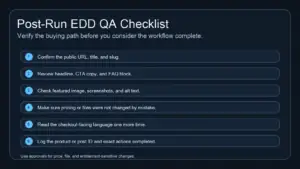
- Run a final QA pass before pushing the content live.
This is a strong fit for teams that want less manual switching between editor, SEO plugin, and operational QA steps.
Common mistakes in WordPress conversion funnel work
Even good teams make the same repeated mistakes:
- optimizing only the page design while ignoring the next-step action
- using generic CTA labels that hide the expected outcome
- publishing content without internal links to the commercial path
- treating SEO metadata as a final chore instead of part of release QA
- making layout changes without checking the mobile conversion path
The fix is not more complexity. It is a cleaner sequence with explicit checkpoints.
Best practices for a repeatable funnel workflow
If you want the workflow to stay useful over time, keep it operational:
- use one primary conversion goal per page
- review copy, layout, and SEO in one release cycle
- document which plugin or page owns each step of the funnel
- reuse QA checklists instead of starting from scratch
- link informational content to the next commercial step naturally
The goal is not to automate every decision. The goal is to remove preventable inconsistency from the WordPress publishing process.
Conclusion
A WordPress conversion funnel workflow with MCP gives you a better operating model for moving from landing page review to CTA refinement, checkout checks, and SEO publishing. That matters more than isolated page tweaks because most funnel losses happen between steps, not within a single screen.
If you want a more structured way to manage these handoffs in WordPress, explore how WEBOMCP and the addon workflow stack can support repeatable content QA, SEO updates, and conversion-focused publishing.