Elementor gives teams a fast way to ship landing pages, sales pages, and content updates, but speed usually creates a second problem: quality control. Copy drifts away from the design, buttons point to old URLs, spacing breaks on mobile, and the final review still depends on someone clicking through the WordPress admin by hand.
This guide shows a practical Elementor content QA workflow with WordPress MCP. It is written for agencies, freelancers, and site operators who want an AI assistant to inspect and patch Elementor pages in a controlled way, while keeping the final publishing decision clear.
What this workflow solves
An Elementor QA workflow is not just a proofreading pass. It combines layout review, copy review, link checking, CTA validation, and publish-readiness checks so the page can move from draft or revision request to a clean final state.
With WordPress MCP, the assistant can inspect structured page content, identify what changed, and suggest or apply targeted fixes without forcing the operator to navigate brittle admin screens for every small issue. That is the practical role of the WEBO MCP Elementor Addon: it gives the agent a cleaner way to read and update Elementor documents through WordPress-aware actions.
The goal is not to automate taste. The goal is to reduce repetitive review work, catch operational mistakes earlier, and leave a clear audit trail when a page is updated for launch.
Before you start
A reliable workflow starts with the right boundaries. Before an assistant touches an Elementor page, make sure the review scope and the publish rules are already defined.
- WordPress access that can read and edit the target page, template, or draft.
- Elementor in active use on the site, with the target document already created.
- A review brief that lists the page goal, audience, CTA, and non-negotiable sections.
- A rule for whether the assistant can publish directly or must stop for approval.
- A short checklist for links, forms, responsive layout, metadata, and featured media.
If multiple people approve visible site changes, keep the review gate explicit. The WEBOMCP article on human-in-the-loop WordPress MCP approvals is a useful companion for teams that want automation without losing control.
How to run an Elementor content QA workflow with WordPress MCP
The strongest workflow follows the same order a careful operator would use: access first, structure second, content third, fixes fourth, and final publish checks last.
1. Give the assistant the right scope
Start by defining exactly which Elementor asset is in scope. That could be a landing page, a reusable template, a sales page, or a blog layout section. The assistant should know the page ID or URL, what can be changed, and what must stay untouched.
This matters because Elementor pages often mix content edits with design decisions. A scoped review prevents the workflow from drifting into unrelated style changes when the real task is to fix copy, links, or CTA logic.
2. Inspect the page structure before editing
Review the page in blocks or sections, not as one giant blob of content. Check the hero, proof section, feature grid, CTA band, form block, FAQ, and footer callout independently. That makes it easier to flag missing headings, duplicated claims, broken anchor links, or weak section transitions.
For WEBOMCP users, this is where the broader WordPress MCP plugin workflow becomes useful: the assistant can reason about WordPress content structures instead of treating the page as raw browser text.
3. Review copy, links, and conversion elements together
Most Elementor quality issues are not design bugs. They are workflow bugs: the hero promise does not match the CTA, button labels are vague, old pricing text survives a revision, or the form and the page headline target two different intents.
A practical review pass should check:
- Headline clarity and whether the first section matches the page goal.
- Button labels, destinations, and repeated CTA consistency.
- Internal links, especially when a page points readers toward product, pricing, or support pages.
- Section order so proof and objections appear before the final CTA.
- SEO basics such as slug alignment, page title, and supporting metadata.
When the page is part of a larger publishing stack, it also helps to align the handoff with the Rank Math SEO workflow for WordPress MCP publishing so design review and metadata review do not happen in separate silos.
4. Apply fixes in controlled batches
Do not let the assistant rewrite the whole page when the real issues are local. Batch the work by section or by issue type. For example, fix all CTA labels first, then broken links, then spacing or copy inconsistencies. Smaller batches make rollback easier and keep review comments readable.
This is also the safest place to compare before-and-after intent. If a patch changes the meaning of the offer, not just the wording, it should be escalated for human review before the page is published.
If your team works across multiple site workflows, the WEBOMCP addons catalog is useful context because Elementor review often overlaps with store ops, SEO, caching, or template updates handled by other addons.
5. Recheck mobile states and the final publish handoff
Before publishing, run one final pass focused on what readers will actually experience. Check mobile spacing, stacked section order, tap targets, form labels, and whether the final CTA still appears at the right point in the page.
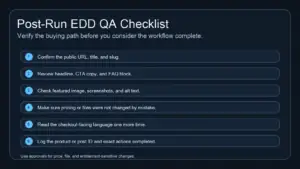
Then confirm the publish handoff items: slug, title, meta description, featured image, visible links, and status. The workflow is only complete when the page is not just edited, but also ready to ship without obvious cleanup tasks left behind.
Practical workflow example for agencies and freelancers
A common agency use case is a client landing page that already exists in Elementor but needs a launch review after several rounds of edits. The page looks mostly finished, yet the final quality pass still takes too long because the reviewer is checking design, copy, and operational details manually.
A cleaner MCP-assisted workflow looks like this:
- Open the target Elementor page and define the conversion goal.
- Ask the assistant to inspect section structure and flag mismatched headlines, duplicated claims, and weak CTA labels.
- Run a second pass on links, form copy, and trust sections.
- Apply approved fixes section by section instead of all at once.
- Finish with responsive QA and metadata handoff before publish.
This keeps the human reviewer focused on judgment while the assistant handles repeatable inspection and patch work. The result is faster review without turning the page into an uncontrolled AI rewrite.
Common mistakes
Most broken workflows fail for predictable reasons:
- Reviewing the whole page at once instead of section by section.
- Letting the assistant change design choices when only content QA was requested.
- Ignoring CTA consistency across hero, mid-page, and final sections.
- Publishing after layout fixes without rechecking links, metadata, or mobile presentation.
- Treating Elementor review as separate from the wider WordPress publishing workflow.
Best practices
The strongest teams keep the workflow simple and repeatable:
- Use a fixed QA brief so each page review starts with the same success criteria.
- Batch edits by issue type for easier review and rollback.
- Require approval when the assistant changes messaging, not just mechanics.
- Keep internal links contextual and verified instead of guessing destination URLs.
- Close every workflow with publish checks, not just content checks.
Conclusion
An effective Elementor content QA workflow with WordPress MCP reduces friction where teams usually lose time: repeated admin clicking, inconsistent page reviews, and last-minute launch mistakes. It gives the assistant a clear operational job while leaving strategic review in human hands.
If you want a cleaner way to inspect and update Elementor pages inside a broader WordPress automation stack, start with the WEBO MCP Elementor Addon and review the full WEBOMCP workflow stack from the addons hub.
FAQ
Can WordPress MCP replace Elementor visual review completely?
No. It can speed up structured inspection and controlled edits, but human review is still the right place for brand judgment and design decisions.
Is this workflow useful for small freelance projects?
Yes. Freelancers benefit because the workflow reduces repeat checks on links, CTA consistency, and publish readiness even when only one person is reviewing the page.
Should Elementor QA happen before or after SEO metadata work?
Content and layout QA should happen first. Metadata should be finalized once the page promise, CTA, and section order are stable.